Essential Biopharma Software for R&D Data Management

Biopharma software is an essential tool for managing R&D data of modern biotech organizations. Biologics development is a data-driven endeavor involving many development stages and cross-functional collaboration. The inherent complexity, variety of disciplines producing data, and the sheer volume of data can easily pose a challenge to biopharma research organizations. Many research teams are using general-purpose data management tools (spreadsheets and files) or systems purpose-built for a single data type. This approach can lead to problems in tracking data and duplicating work. This blog post focuses on key considerations when selecting biopharma software for managing R&D data. 

biopharma software

Biopharma data management challenges include:

  • Integrating data generated from disparate scientific specialties
  • Difficulty in finding and highlighting important data (leading to duplication of work)
  • Variabilities in data structure and conventions
  • Lack of visibility into data provenance

These challenges make it difficult for biopharma researchers to answer some basic scientific questions about their data:

  • Do I have the data I need?
  • What is this data? (structured data model, definitions)
  • Where did this data come from? (data provenance, audit history)
  • How and why was it generated? (reproducibility, workflow processes)

Biopharma software can help centralize research data and enforce data standards. This allows for quick and confident answers to the questions scientists ask about their data. Along with data capture, standardizing and monitoring processes is critical to tracking biopharma R&D activity and reducing data inconsistencies.

Biopharma software should include integrated tools for data management.

The LabKey Biologics LIMS provides a central bioregistry with integrated assay data capture, workflow management, and a “data-connected” electronic lab notebook. We consider these to be the pillars of a comprehensive biopharma software solution for data management.

Bioregistry

A bioregistry helps scientists define, register, and review interconnected biological entities and their samples. By centralizing biopharma R&D data, researchers can easily find, view, and navigate through entities, their lineage, and data relationships. For example, using a bioregistry, scientists can easily find a specific molecule and see all the related sequences, samples containing it, and related assay data.

Assay Data Management

Assay data is the decision-making criteria for discovery, process development, and quality. It is generated by all contributing teams and its relevance endures throughout. Having a central, structured, and workflow-related assay data capture mechanism is essential for streamlining decision making, hand-offs, and post hoc analysis. It ensures that consistent data structures are used throughout the biopharma development process, sets expectations for needed data, and makes clear where critical data can be found.

Electronic Lab Notebook

An ELN is designed to help scientists efficiently organize and document their ongoing research. A data-connected ELN provides even more value by having access to the bioregistry, assay, and sample data captured so that additional work is not required to find and include it. This integration paradigm maintains data integrity while enabling easy data exploration and collaboration.

Workflow Management

Defining collaborative biopharma workflows helps set expectations for contributors and managers. It supports the fulfillment of material and data needs and prepares the way for process optimization, scheduling, and cross-team alignment. These workflow tools facilitate strategic experimentation, simpler data hand-off, and easier planning.

Biologics LIMS- Biopharma R&D software designed for efficient data management.

Biologics LIMS is a powerful suite of integrated tools to help scientists manage biologics research data, improve lab processes, and collaborate efficiently. The software provides biopharma researchers with streamlined registration and tracking of biological entities and samples in a central bioregistry. The bioregistry is seamlessly integrated with tools for workflow management, assay data management, and an electronic lab notebook (ELN). This combination of software tools forms a cohesive application that serves as a central hub for managing biotherapeutic development data, processes, lab notebooks, and collaboration efforts.

LabKey Biologics helps scientists:

  • Speed up decision-making with unified ELN, bioregistry, workflow, and assay data management tools
  • Centralize and connect data for a holistic view of your data landscape and interrelationships
  • Manage and optimize lab processes with a workflow tool designed for biopharma R&D
Click here to learn more about LabKey Biologics and take a product tour.

What Is a Bioregistry?

From cell lines and constructs to their vectors and insert sequences, biotherapeutic development involves many moving parts that need to be defined and connected. Using spreadsheets to manage this data and their inter-relationships is a highly inefficient and error-prone endeavor. Without a central bioregistry to capture and track all of these pieces, researchers could end up with data that is inaccurate, redundant, and insufficient. 

A bioregistry is a structured data repository that helps scientists answer a multitude of questions during the biotherapeutic development process. By efficiently attaining answers to those questions scientists can make data-driven decisions, increase efficiency, and trust the integrity of their data. Time is precious in biotherapeutic development and reducing duplicative efforts and time wasted in finding entity information can be highly advantageous to most organizations. 

Adopting a bioregistry can provide biopharma organizations with the following benefits:

What is a bioregistry?

  • Centralization of information for critical biological entities and protection of intellectual property
  • Eliminating duplication and improving data integrity by verifying the uniqueness of entities upon registration
  • Creation of links between samples, entities, electro nic lab notebooks and entity creation processes (protein, expression, purification, characterization)

The LabKey Biologics Bioregistry

LabKey Biologics includes a fully integrated bioregistry as part of a suite of integrated software tools for biotherapeutic development. The bioregistry captures complete entity and sample information for molecular entities, nucleotide sequences, protein sequences, expression systems, constructs, vectors and cell lines. Researchers can easily navigate through entities and their relationships. For example, researchers can find a specific molecule and see the component sequences, the samples of that molecule and the assay data associated with those samples.

Click Here to learn more about LabKey Biologics and take a tour!

Centralizing Biologics Assay Data with LabKey Biologics

[vc_video link=”https://youtu.be/2WpQ_ncpsMQ” el_width=”80″ align=”center”]Centralizing biologics assay data so it can be easily viewed and analyzed in a single place is one of the core challenges biotherapeutic research teams encounter. Without centralized assay data, teams must turn to time-consuming and error-prone manual integration methods to collaborate and maximize the value of their analytical data.

LabKey Server’s robust mechanisms for defining assays and uploading assay data are helpful for bringing analytical data into a single system, but our biologics software– LabKey Biologics, takes this one step further and provides valuable structure and connections that help biologics research teams understand how that analytical data fits into the larger context.

LabKey Assay Designs: Standardizing Analytical Data Structures

LabKey Biologics allows teams to define or customize biologics assay designs (many editable assay design templates come pre-defined within the system) to capture assay data in a specific structure. Some teams using LabKey Biologics may need to define only a few assay designs to support their research, while others working in a more complex environment may need to define 100+.

When building an assay design, laboratory teams can choose to add fields specific to batches, runs and results to provide additional context for their data. LabKey supports a wide variety of field types (including integer, float, boolean, and text) and users can configure aliases, validation rules, and a variety of other characteristics for each.

Centralizing Assay Data In the System

Once an assay design has been built in LabKey Biologics, data can be added to the system using that design to provide its structure. There are a number of different ways to load your assay data into LabKey Biologics including:

  • Automatically uploading via the LabKey API
  • Manually uploading spreadsheets
  • Pasting spreadsheet-type data
  • Entering data into a form

The first strategy, automatically uploading, leverages the APIs of LabKey Biologics to allow other instruments or file systems to talk directly to the system. The other three strategies involved a manual process suitable for varying use cases. If you have a large spreadsheet to integrate, you might want to use the manual upload method or paste the tabular data directly into the application. If you just have a couple of values you want to enter, simply entering the data into a form in the LabKey Biologics UI might be the simplest strategy.

Leveraging Sample Lineage for Context

As you know, analytical data generated during experiments is tied to a specific sample. Because the lineage of samples is tracked in LabKey Biologics, the application will automatically query sample lineage when data is uploaded and present relevant biological entities side-by-side with analytical data in the bioregistry. Showing the sequence or molecule information adjacent to the analytical data, allows scientists to easily ask questions of their data and conduct comparisons with other sequences that are seen in different experiments.

Ready to see this functionality in action? Watch the quick look video above. For more information or to request a demo- Click Here

What’s New in LabKey Biologics 19.1

LabKey has continued to improve and enhance the LabKey Biologics application with the release of version 19.1! We continue to work with our users to prioritize the most needed features and solutions for R&D teams.

Highlights

  • Users can now create a custom chart or a view of a data grid once, and then see that view anywhere that’s relevant within Biologics. This allows you to design a report or graph, but be able to repeatedly see that analysis filtered to the samples in any particular experiment.
  • Media and batch creation enhancements better match real world needs for flexibility with clarity. Import ingredient and raw material information in bulk, include “unknowns” for mixtures when necessary, and enter additional ingredients to a recipe during creation of a batch.
  • Sample set operations have also been improved, with easier-to-read views of associated assay data as well as improved performance for importing and updating samples.
  • Scientists need the flexibility to store arbitrary file types with their work, including published articles, SOPs, supplemental datasets, and images. You can now attach any number of files to a specific experiment, providing context and analysis of what occurred.

View Full Release Notes >


Upcoming Events

Webinar: Intro to LabKey Biologics: May 2, 2019

LabKey Biologics WebinarJoin LabKey Product Manager, Ryan Luce, Ph.D, for an introduction to LabKey Biologics! Explore the entity registration, data integration, and workflow management capabilities of the LabKey Biologics system.
Learn More & Register

LabKey User Conference, BaselLabKey User Conference & Training – Basel

June 4-5, 2019 | 2 Days
Basel, Switzerland

Learn More & Register!

LabKey User Meeting, LondonLabKey User Meeting – London

June 6, 2019 | FREE
London, UK
Learn More & Register!

LabKey User Conference and Workshop, SeattleLabkey User Conference & Workshop – Seattle

October 3-4, 2019 | 2 Days
Seattle, Washington, USA
Learn More & Register!


More on the Blog

Barriers to R&D Productivity: Manual Data Integration Strategies

Barriers to R&D Productivity: Lack of Visibility into Previously Generated Data

Barriers to R&D Productivity: Lacking a Central Point of Access to Data

Barriers to R&D Productivity: What’s Slowing Down My Research?

What’s New in LabKey Biologics

Over the past few months, the LabKey team has made several key enhancements to the LabKey Biologics application to help teams organize and visualize data relationships. Take a look at some of these recent enhancement below.

Group Sample and Assay Data Using the Biologics Experiment Framework

An experiment framework has been added to LabKey Biologics that allows users to group all the data relevant to a single experiment. Teams can define a name and description for each experiment, add samples, and upload analytical results.

Navigate Between Generations of Samples with the New Lineage Grid View

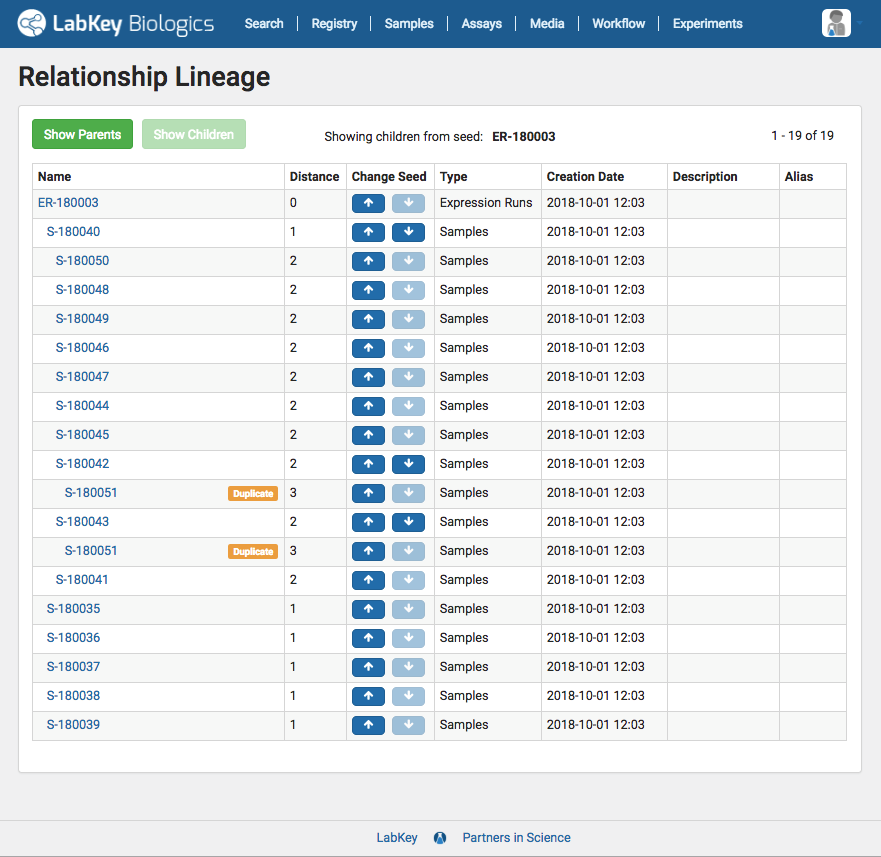
In addition to the existing lineage visualizations, LabKey Biologics users can now view all of the ancestors and descendants of a particular sample in an easy to navigate lineage grid. This grid view is particularly helpful when viewing lineage data for samples with large quantities of related samples or lengthy derivation history.

Auto-Register Sequences During GenBank File Import

Improvements to LabKey Biologics import process enable to the auto-registration of multiple sequences when a GenBank file is uploaded. With these changes the full sequence of the plasmid, the coding sequences, and the resultant protein sequences are now auto-registered.

Want to see these features in action

Explore LabKey Biologics free for 30-days in our hosted trial environment, or contact us to request a demo.

Data-Driven Tools for Optimizing Cell Culture Media

Cell culture is a central component of protein development and the media used during this process can have a significant impact on its performance. In the R&D environment, media technicians are responsible for both the precise production of cell culture media and the optimization of media recipes to maximize qualities such as growth and stability.

Capturing the detailed information about recipes, ingredients, and batches needed to optimize media production is one of the key challenges faced within protein engineering. The advances in cell culture technologies in recent years have quickly outpaced simple spreadsheet and database-based systems for storing media recipes and batch IDs. Today’s media technicians need software tools to consistently structure data about media recipes, ingredients and batches, so it can be easily accessed and queried on demand.

LabKey Biologics provides essential tools to help protein engineering teams overcome key challenges in cell culture media development, including:

Capture the steps, ingredients, concentrations, and other details of cell culture media recipes in the LabKey Biologics software

Detailed Recipe Registration

Registering a recipe in LabKey Biologics allows technicians to specify all of the information needed for its execution including ingredients, ingredient concentrations, steps for creating the mixture, expiration time, and other key aspects. The system also allows the creation of mixtures that contain other mixtures, even when you don’t know all of their underlying concentrations or ingredients (as is often the case with vendor-supplied mixtures).

Media technicians have a number of different methods available for registering media recipes, depending on their complexity and scale. Technicians can create recipes individually using the media registration UI or they can register many recipes at once using bulk upload features or programmatic registration via LabKey Biologics API.

Software tools for creating consistent cell culture media batches.Consistent Batch Preparation

LabKey Biologics helps minimize formulation errors by auto-calculating the amounts for each ingredient in a recipe based on a target mixture amount. As a technician prepares a batch of mixture, they are prompted to input the actual amount of each ingredient used, as well as the raw material ID. If the media technician needs to use multiple bottles of a raw ingredient to fulfill the formulation, the system will allow them to register multiple raw materials for a single ingredients.

Data driven cell culture media optimization using LabKey Biologics softwareFollowing the Media Trail

The structured data captured in LabKey Biologics allows R&D teams to track the complete lineage of each individual sample, and present lineage as a visualization or grid. Sample characteristics, assay results, and relevant media details are tied together allowing media technicians to troubleshoot problematic raw materials, better optimize their batches, and improve upon media recipes to improve protein yield.

With the right tools, cell culture media technicians can consistently produce media batches and iterate media recipes to maximize performance. Request a demo to see this functionality in action and learn more about how LabKey Biologics can help accelerate your biotherapeutic R&D.

LabKey Biologics for Protein Engineers

LabKey Biologics registration and classification tools for protein engineersThe focus of pharmaceutical and biotech research has seen a significant shift in recent years. Many research teams are no longer driving towards building small molecules, but are instead focused on designing new protein-based therapeutics. Protein engineers at these organizations are often responsible for the structural design of target molecules as well as the experimental protein production and characterization of their designs.
To support this work, protein engineers need biologics software tools to capture details about molecular components such as proteins, antibodies, plasmids and cell lines, as well as the detailed steps of the development process. LabKey Biologics provides an easy to use system for centralizing this information and additional tools to help facilitate protein design including:

Uniqueness Verification

There are a number of entities that might be critical for a research organization to register in a bioregistry. These could include:

  • Protein Sequences
  • Nucleotide Sequences
  • Molecules (ex: Antibodies)
  • Plasmids
  • Cell Lines

Each of these entities is checked for uniqueness when they are registered in LabKey Biologics.  This prevents dirty data caused by duplicate records and reduces duplicate work for protein engineers. Uniqueness checks are in place for all entity types, whether you are registering a single sequence or a molecule composed of multiple protein sequences.

Uniqueness checks are also run on data auto-registered during the import of a GenBank file. In that case, LabKey Biologics will register plasmids during the import of a GenBank file, but also auto-register any regions that translate to protein sequences. If a protein sequence already exists, the system will register only the relationship between the plasmid and that protein sequence, not create a new sequence.

Classification by Protein Engineers

LabKey Biologics includes a classification engine that can identify, predict, and calculate various characteristics of registered molecules. This saves protein engineers valuable time manually assigning classifications.

The system automatically detects many regions and features of protein sequences including leader sequences, variable regions, constant regions, and CDRs. LabKey Biologics can also be trained to recognize additional sequence classifications, for example, by registering a leader sequences as a “Leader” within the system, it will recognize future leader sequences that match it.

LabKey Biologics can also recognize heavy chains and light chains and predict their type,  based on the amino acid sequence of a registered protein, as well as the isotype of the overall antibody.

For all of these classifications, whether LabKey Biologics is detecting subsequences on the amino acid sequence or the type of overall sequences, the protein engineer can always override the classification engine if the prediction is incorrect.

Integration with Other Systems

Often times, protein engineers are using another application to design proteins or plasmids. LabKey Biologics makes it easy to bring this data into the system, either via APIs or by bulk upload. Regardless of the registration method, the same classification and uniqueness checking features apply to all registered entities.

To see this functionality in action, request a demo! To learn more about LabKey Biologics check out our documentation and resources on the LabKey Support Portal.

The Power of Structured Data: Customizing Grid Views in LabKey Biologics

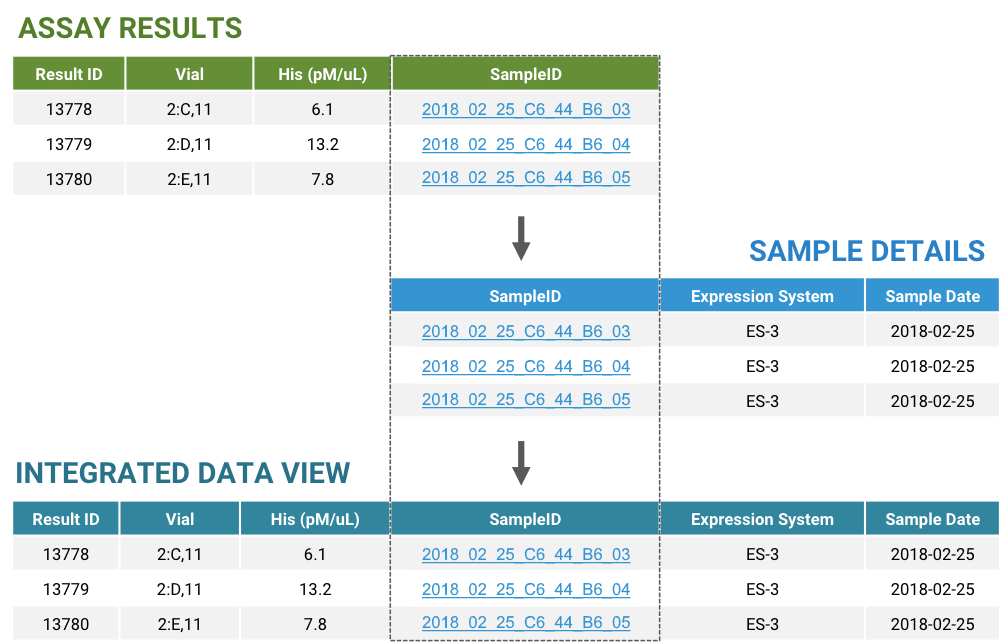
When analyzing biologics assay data, scientists often need to look beyond the results at related data to answer their research questions. Comparing lineage characteristics like which expression system was used to generate an experiment sample or details about the sample itself, such as the buffer used in it, can uncover crucial data patterns and insights.

This type of data exploration requires data to be captured in a structured manner and integrated into a central system where it can be easily accessed, queried, and analyzed.

Structuring Data for Maximum Value

LabKey Biologics provides tools to ensure that data is correctly structured and consistently stored. For each data type within the LabKey Biologics application, users are able to configure a specific structure, indicating the names of fields as well as their type. Because this data is consistently structured, a user can pull together relevant data from different sources for an integrated view of their data during analysis.

Integrating structured assay and sample data in LabKey Biologics using Sample IDs and look-ups.

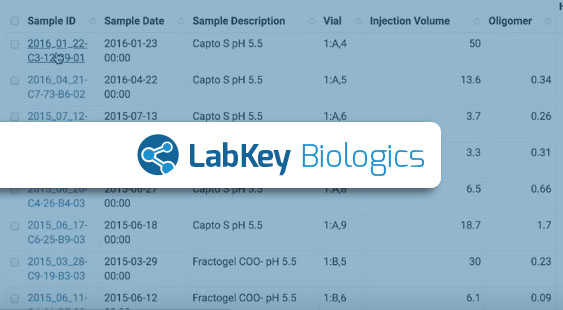
For example, when looking at the results for a specific assay type, such as optical density, a user can add details about the samples themselves to the assay results data grid. This might include the buffer used, the expression system used to create it, or the name of the antibody (or other molecule) that was being produced.

Customized Data Views for Quicker Access

Users can customize the default assay data grid view to include these additional look-up columns. Customized default views provide quick access to all the data relevant to the user’s research, instead of having to join data each time they view the dataset. Users can also sort, filter, and search the data in these additional columns the same way they can with native assay data fields.[vc_cta h2=””]To see this functionality in action, request a demo! To learn more about LabKey Biologics check out our documentation and resources on the LabKey Support Portal. [/vc_cta]